

When you’re looking at comps on eBay to see what cards have sold for, one thing that’s a little annoying is how eBay displays sales that were made by accepting a “Best Offer”.
If you’re looking through sold items, you’ll see the original listing price with a line drawn through it and the words “Best Offer Accepted” listed underneath.
Here’s an example of a Presentations card of Ja Morant.
As an aside, I really feel like Hoops did a great job with the Presentations insert. I’m not sure why they’re all headshots when the early artwork we saw was more of an action shot, but regardless, they look sharp and I think they’re the clear favorite from this year’s Hoops release.
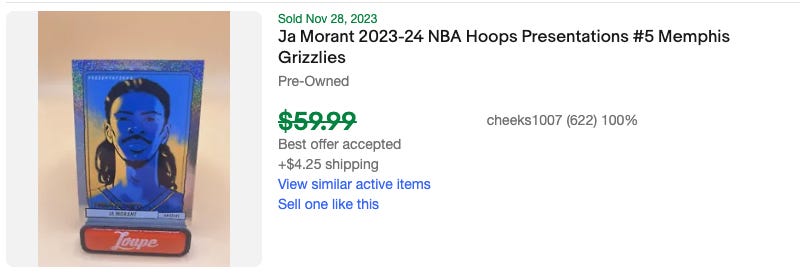
The card was listed at $59.99, but what we can’t see is what it actually sold for.
Now, you could find this out using 130point.com—a site I tend to use a lot. You could also use an app like Market Movers. In either case, however, if you want to see this particular sale, you’re going to have to search for all “Ja Morant Presentations” sales and then parse through the listings to find it.
That works, and Market Movers in particular is great if you want to the overall trend for the card. But sometimes you want to see it in context.
For that, you can use the Cardboard Market Chrome Extension. With that extension installed, when you browse completed listings on eBay, you’ll now see a “View Price” link right next to the crossed out listing price.
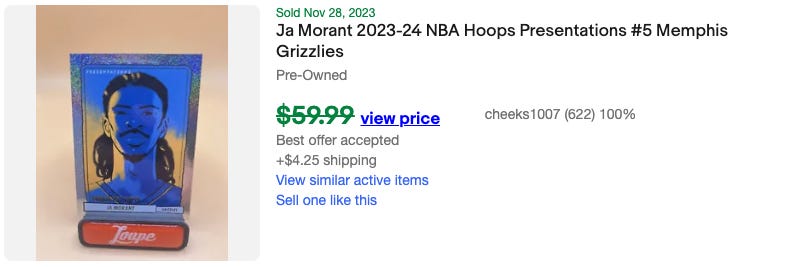
Once you click it, you can see the price the card actually sold for.
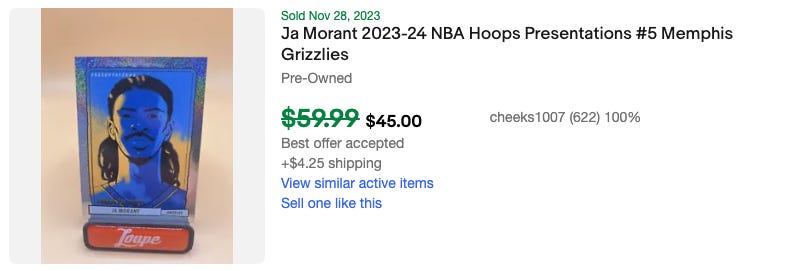
I’m honestly not sure why eBay doesn’t just do this by default. It feels like that would be better for sellers and buyers—the fact that the original listing price shows instead of the actual sales price definitely leads to confusion at times about the actual value of cards.
Hopefully eBay decides to make a change at some point in the future and show the selling price by default, but until then, the Cardboard Market extension is a must have for both buyers and sellers alike.